Instructions to use redponike/Ling-mini-2.0-GGUF with libraries, inference providers, notebooks, and local apps. Follow these links to get started.
- Libraries
- Transformers
How to use redponike/Ling-mini-2.0-GGUF with Transformers:
# Use a pipeline as a high-level helper from transformers import pipeline pipe = pipeline("text-generation", model="redponike/Ling-mini-2.0-GGUF") messages = [ {"role": "user", "content": "Who are you?"}, ] pipe(messages)# Load model directly from transformers import AutoModel model = AutoModel.from_pretrained("redponike/Ling-mini-2.0-GGUF", dtype="auto") - llama-cpp-python
How to use redponike/Ling-mini-2.0-GGUF with llama-cpp-python:
# !pip install llama-cpp-python from llama_cpp import Llama llm = Llama.from_pretrained( repo_id="redponike/Ling-mini-2.0-GGUF", filename="Ling-mini-2.0-IQ3_M.gguf", )
llm.create_chat_completion( messages = [ { "role": "user", "content": "What is the capital of France?" } ] ) - Notebooks
- Google Colab
- Kaggle
- Local Apps
- llama.cpp
How to use redponike/Ling-mini-2.0-GGUF with llama.cpp:
Install from brew
brew install llama.cpp # Start a local OpenAI-compatible server with a web UI: llama-server -hf redponike/Ling-mini-2.0-GGUF:Q4_K_M # Run inference directly in the terminal: llama-cli -hf redponike/Ling-mini-2.0-GGUF:Q4_K_M
Install from WinGet (Windows)
winget install llama.cpp # Start a local OpenAI-compatible server with a web UI: llama-server -hf redponike/Ling-mini-2.0-GGUF:Q4_K_M # Run inference directly in the terminal: llama-cli -hf redponike/Ling-mini-2.0-GGUF:Q4_K_M
Use pre-built binary
# Download pre-built binary from: # https://github.com/ggerganov/llama.cpp/releases # Start a local OpenAI-compatible server with a web UI: ./llama-server -hf redponike/Ling-mini-2.0-GGUF:Q4_K_M # Run inference directly in the terminal: ./llama-cli -hf redponike/Ling-mini-2.0-GGUF:Q4_K_M
Build from source code
git clone https://github.com/ggerganov/llama.cpp.git cd llama.cpp cmake -B build cmake --build build -j --target llama-server llama-cli # Start a local OpenAI-compatible server with a web UI: ./build/bin/llama-server -hf redponike/Ling-mini-2.0-GGUF:Q4_K_M # Run inference directly in the terminal: ./build/bin/llama-cli -hf redponike/Ling-mini-2.0-GGUF:Q4_K_M
Use Docker
docker model run hf.co/redponike/Ling-mini-2.0-GGUF:Q4_K_M
- LM Studio
- Jan
- vLLM
How to use redponike/Ling-mini-2.0-GGUF with vLLM:
Install from pip and serve model
# Install vLLM from pip: pip install vllm # Start the vLLM server: vllm serve "redponike/Ling-mini-2.0-GGUF" # Call the server using curl (OpenAI-compatible API): curl -X POST "http://localhost:8000/v1/chat/completions" \ -H "Content-Type: application/json" \ --data '{ "model": "redponike/Ling-mini-2.0-GGUF", "messages": [ { "role": "user", "content": "What is the capital of France?" } ] }'Use Docker
docker model run hf.co/redponike/Ling-mini-2.0-GGUF:Q4_K_M
- SGLang
How to use redponike/Ling-mini-2.0-GGUF with SGLang:
Install from pip and serve model
# Install SGLang from pip: pip install sglang # Start the SGLang server: python3 -m sglang.launch_server \ --model-path "redponike/Ling-mini-2.0-GGUF" \ --host 0.0.0.0 \ --port 30000 # Call the server using curl (OpenAI-compatible API): curl -X POST "http://localhost:30000/v1/chat/completions" \ -H "Content-Type: application/json" \ --data '{ "model": "redponike/Ling-mini-2.0-GGUF", "messages": [ { "role": "user", "content": "What is the capital of France?" } ] }'Use Docker images
docker run --gpus all \ --shm-size 32g \ -p 30000:30000 \ -v ~/.cache/huggingface:/root/.cache/huggingface \ --env "HF_TOKEN=<secret>" \ --ipc=host \ lmsysorg/sglang:latest \ python3 -m sglang.launch_server \ --model-path "redponike/Ling-mini-2.0-GGUF" \ --host 0.0.0.0 \ --port 30000 # Call the server using curl (OpenAI-compatible API): curl -X POST "http://localhost:30000/v1/chat/completions" \ -H "Content-Type: application/json" \ --data '{ "model": "redponike/Ling-mini-2.0-GGUF", "messages": [ { "role": "user", "content": "What is the capital of France?" } ] }' - Ollama
How to use redponike/Ling-mini-2.0-GGUF with Ollama:
ollama run hf.co/redponike/Ling-mini-2.0-GGUF:Q4_K_M
- Unsloth Studio new
How to use redponike/Ling-mini-2.0-GGUF with Unsloth Studio:
Install Unsloth Studio (macOS, Linux, WSL)
curl -fsSL https://unsloth.ai/install.sh | sh # Run unsloth studio unsloth studio -H 0.0.0.0 -p 8888 # Then open http://localhost:8888 in your browser # Search for redponike/Ling-mini-2.0-GGUF to start chatting
Install Unsloth Studio (Windows)
irm https://unsloth.ai/install.ps1 | iex # Run unsloth studio unsloth studio -H 0.0.0.0 -p 8888 # Then open http://localhost:8888 in your browser # Search for redponike/Ling-mini-2.0-GGUF to start chatting
Using HuggingFace Spaces for Unsloth
# No setup required # Open https://huggingface.co/spaces/unsloth/studio in your browser # Search for redponike/Ling-mini-2.0-GGUF to start chatting
- Pi new
How to use redponike/Ling-mini-2.0-GGUF with Pi:
Start the llama.cpp server
# Install llama.cpp: brew install llama.cpp # Start a local OpenAI-compatible server: llama-server -hf redponike/Ling-mini-2.0-GGUF:Q4_K_M
Configure the model in Pi
# Install Pi: npm install -g @mariozechner/pi-coding-agent # Add to ~/.pi/agent/models.json: { "providers": { "llama-cpp": { "baseUrl": "http://localhost:8080/v1", "api": "openai-completions", "apiKey": "none", "models": [ { "id": "redponike/Ling-mini-2.0-GGUF:Q4_K_M" } ] } } }Run Pi
# Start Pi in your project directory: pi
- Hermes Agent new
How to use redponike/Ling-mini-2.0-GGUF with Hermes Agent:
Start the llama.cpp server
# Install llama.cpp: brew install llama.cpp # Start a local OpenAI-compatible server: llama-server -hf redponike/Ling-mini-2.0-GGUF:Q4_K_M
Configure Hermes
# Install Hermes: curl -fsSL https://hermes-agent.nousresearch.com/install.sh | bash hermes setup # Point Hermes at the local server: hermes config set model.provider custom hermes config set model.base_url http://127.0.0.1:8080/v1 hermes config set model.default redponike/Ling-mini-2.0-GGUF:Q4_K_M
Run Hermes
hermes
- Docker Model Runner
How to use redponike/Ling-mini-2.0-GGUF with Docker Model Runner:
docker model run hf.co/redponike/Ling-mini-2.0-GGUF:Q4_K_M
- Lemonade
How to use redponike/Ling-mini-2.0-GGUF with Lemonade:
Pull the model
# Download Lemonade from https://lemonade-server.ai/ lemonade pull redponike/Ling-mini-2.0-GGUF:Q4_K_M
Run and chat with the model
lemonade run user.Ling-mini-2.0-GGUF-Q4_K_M
List all available models
lemonade list
GGUF quants of Ling-mini-2.0
llama.cpp usage: --jinja argument needs to be passed
Using llama.cpp (commit 6de8ed75196c7cd98c1f34bbf3a7452451ba8ac2)
The importance matrix was generated with eaddario/imatrix-calibration combined_all_medium dataset.
All quants were generated/calibrated with the imatrix, including the K quants.
Compressed from BF16.
🤗 Hugging Face | 🤖 ModelScope | 🐙 Experience Now
Introduction
Today, we are excited to announce the open-sourcing of Ling 2.0 — a family of MoE-based large language models that combine SOTA performance with high efficiency. The first released version, Ling-mini-2.0, is compact yet powerful. It has 16B total parameters, but only 1.4B are activated per input token (non-embedding 789M). Trained on more than 20T tokens of high-quality data and enhanced through multi-stage supervised fine-tuning and reinforcement learning, Ling-mini-2.0 achieves remarkable improvements in complex reasoning and instruction following. With just 1.4B activated parameters, it still reaches the top-tier level of sub-10B dense LLMs and even matches or surpasses much larger MoE models.

Strong General and Professional Reasoning
We evaluated Ling-mini-2.0 on challenging general reasoning tasks in coding (LiveCodeBench, CodeForces) and mathematics (AIME 2025, HMMT 2025), as well as knowledge-intensive reasoning tasks across multiple domains (MMLU-Pro, Humanity's Last Exam). Compared with sub-10B dense models (e.g., Qwen3-4B-instruct-2507, Qwen3-8B-nothinking) and larger-scale MoE models (Ernie-4.5-21B-A3B-PT, GPT-OSS-20B/low), Ling-mini-2.0 demonstrated outstanding overall reasoning capabilities.
7× Equivalent Dense Performance Leverage
Guided by Ling Scaling Laws, Ling 2.0 adopts a 1/32 activation ratio MoE architecture, with empirically optimized design choices in expert granularity, shared expert ratio, attention ratio, aux-loss free + sigmoid routing strategy, MTP loss, QK-Norm, half RoPE, and more. This enables small-activation MoE models to achieve over 7× equivalent dense performance. In other words, Ling-mini-2.0 with only 1.4B activated parameters (non-embedding 789M) can deliver performance equivalent to a 7–8B dense model.
High-speed Generation at 300+ token/s
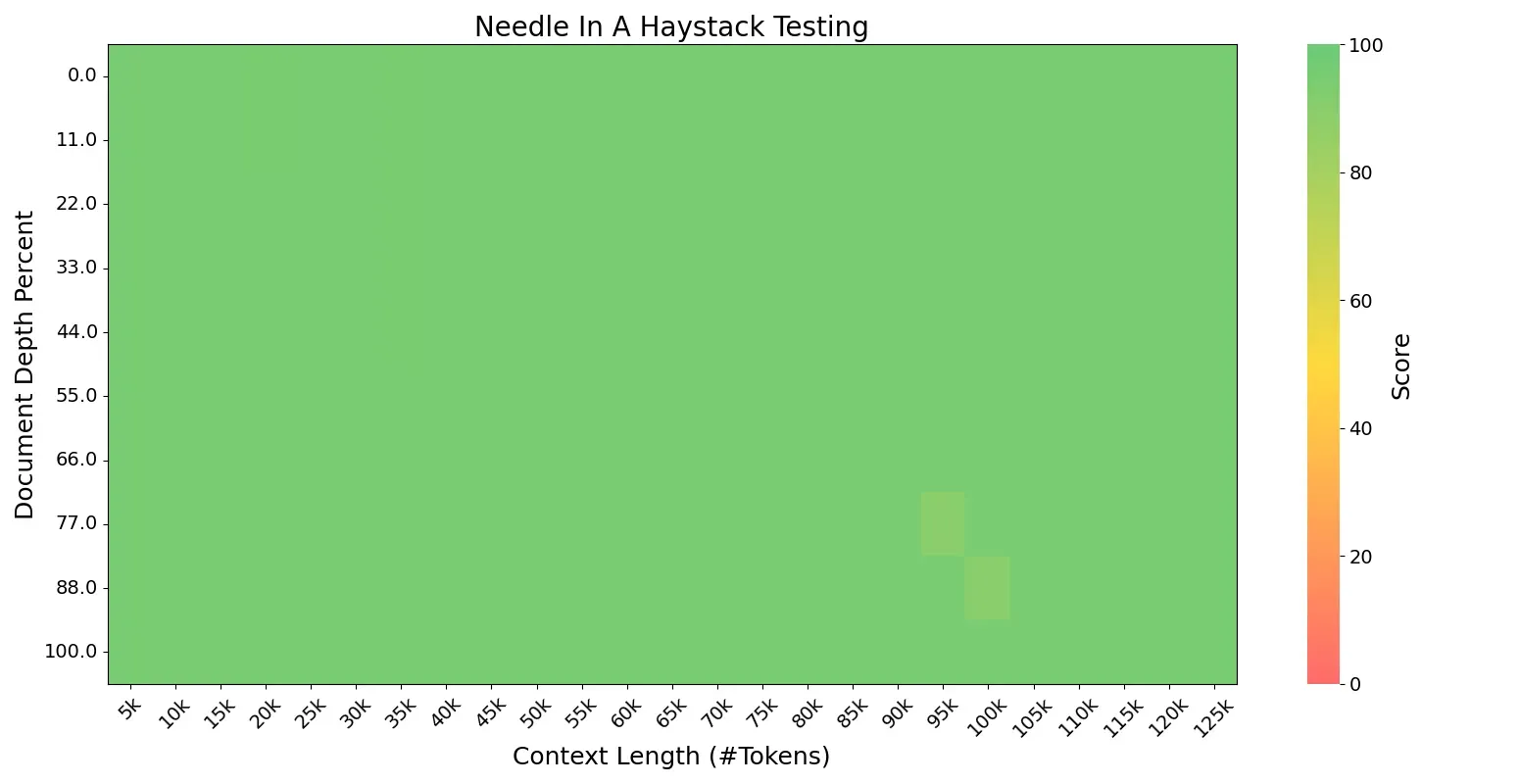
The highly sparse small-activation MoE architecture also delivers significant training and inference efficiency. In simple QA scenarios (within 2000 tokens), Ling-mini-2.0 generates at 300+ token/s (on H20 deployment) — more than 2× faster than an 8B dense model. Ling-mini-2.0 is able to handle 128K context length with YaRN, as sequence length increases, the relative speedup can reach over 7×.
Open-sourced FP8 Efficient Training Solution
Ling 2.0 employs FP8 mixed-precision training throughout. Compared with BF16, experiments with over 1T training tokens show nearly identical loss curves and downstream benchmark performance. To support the community in efficient continued pretraining and fine-tuning under limited compute, we are also open-sourcing our FP8 training solution. Based on tile/blockwise FP8 scaling, it further introduces FP8 optimizer, FP8 on-demand transpose weight, and FP8 padding routing map for extreme memory optimization. On 8/16/32 80G GPUs, compared with LLaMA 3.1 8B and Qwen3 8B, Ling-mini-2.0 achieved 30–60% throughput gains with MTP enabled, and 90–120% throughput gains with MTP disabled.
A More Open Opensource Strategy
We believe Ling-mini-2.0 is an ideal starting point for MoE research. For the first time at this scale, it integrates 1/32 sparsity, MTP layers, and FP8 training — achieving both strong effectiveness and efficient training/inference performance, making it a prime candidate for the small-size LLM segment. To further foster community research, in addition to releasing the post-trained version, we are also open-sourcing five pretraining checkpoints: the pre-finetuning Ling-mini-2.0-base, along with four base models trained on 5T, 10T, 15T, and 20T tokens, enabling deeper research and broader applications.
- Downloads last month
- 1
3-bit
4-bit
5-bit
6-bit
8-bit
Model tree for redponike/Ling-mini-2.0-GGUF
Base model
inclusionAI/Ling-mini-base-2.0