Instructions to use Azma-AI/Meta-Llama-3-8B-Instruct-64k-PoSE with libraries, inference providers, notebooks, and local apps. Follow these links to get started.
- Libraries
- Transformers
How to use Azma-AI/Meta-Llama-3-8B-Instruct-64k-PoSE with Transformers:
# Use a pipeline as a high-level helper from transformers import pipeline pipe = pipeline("text-generation", model="Azma-AI/Meta-Llama-3-8B-Instruct-64k-PoSE") messages = [ {"role": "user", "content": "Who are you?"}, ] pipe(messages)# Load model directly from transformers import AutoTokenizer, AutoModelForCausalLM tokenizer = AutoTokenizer.from_pretrained("Azma-AI/Meta-Llama-3-8B-Instruct-64k-PoSE") model = AutoModelForCausalLM.from_pretrained("Azma-AI/Meta-Llama-3-8B-Instruct-64k-PoSE") messages = [ {"role": "user", "content": "Who are you?"}, ] inputs = tokenizer.apply_chat_template( messages, add_generation_prompt=True, tokenize=True, return_dict=True, return_tensors="pt", ).to(model.device) outputs = model.generate(**inputs, max_new_tokens=40) print(tokenizer.decode(outputs[0][inputs["input_ids"].shape[-1]:])) - Notebooks
- Google Colab
- Kaggle
- Local Apps
- vLLM
How to use Azma-AI/Meta-Llama-3-8B-Instruct-64k-PoSE with vLLM:
Install from pip and serve model
# Install vLLM from pip: pip install vllm # Start the vLLM server: vllm serve "Azma-AI/Meta-Llama-3-8B-Instruct-64k-PoSE" # Call the server using curl (OpenAI-compatible API): curl -X POST "http://localhost:8000/v1/chat/completions" \ -H "Content-Type: application/json" \ --data '{ "model": "Azma-AI/Meta-Llama-3-8B-Instruct-64k-PoSE", "messages": [ { "role": "user", "content": "What is the capital of France?" } ] }'Use Docker
docker model run hf.co/Azma-AI/Meta-Llama-3-8B-Instruct-64k-PoSE
- SGLang
How to use Azma-AI/Meta-Llama-3-8B-Instruct-64k-PoSE with SGLang:
Install from pip and serve model
# Install SGLang from pip: pip install sglang # Start the SGLang server: python3 -m sglang.launch_server \ --model-path "Azma-AI/Meta-Llama-3-8B-Instruct-64k-PoSE" \ --host 0.0.0.0 \ --port 30000 # Call the server using curl (OpenAI-compatible API): curl -X POST "http://localhost:30000/v1/chat/completions" \ -H "Content-Type: application/json" \ --data '{ "model": "Azma-AI/Meta-Llama-3-8B-Instruct-64k-PoSE", "messages": [ { "role": "user", "content": "What is the capital of France?" } ] }'Use Docker images
docker run --gpus all \ --shm-size 32g \ -p 30000:30000 \ -v ~/.cache/huggingface:/root/.cache/huggingface \ --env "HF_TOKEN=<secret>" \ --ipc=host \ lmsysorg/sglang:latest \ python3 -m sglang.launch_server \ --model-path "Azma-AI/Meta-Llama-3-8B-Instruct-64k-PoSE" \ --host 0.0.0.0 \ --port 30000 # Call the server using curl (OpenAI-compatible API): curl -X POST "http://localhost:30000/v1/chat/completions" \ -H "Content-Type: application/json" \ --data '{ "model": "Azma-AI/Meta-Llama-3-8B-Instruct-64k-PoSE", "messages": [ { "role": "user", "content": "What is the capital of France?" } ] }' - Docker Model Runner
How to use Azma-AI/Meta-Llama-3-8B-Instruct-64k-PoSE with Docker Model Runner:
docker model run hf.co/Azma-AI/Meta-Llama-3-8B-Instruct-64k-PoSE
Meta-Llama-3-8B-Instruct-64k-PoSE
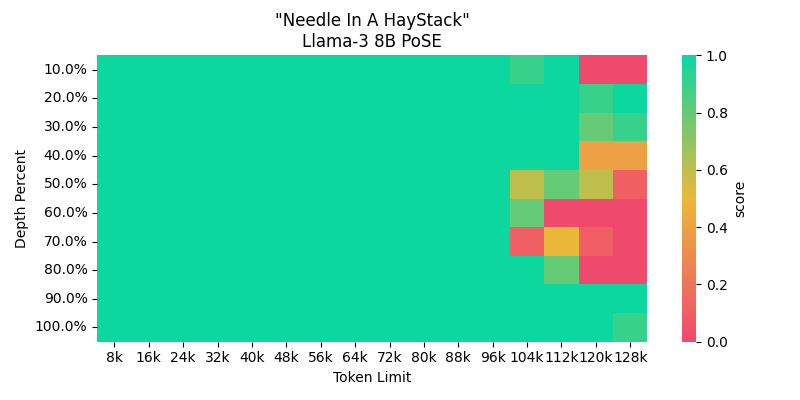
This is a custom version of the Meta Llama 3 8B instruction-tuned language model with an extended context length of up to 64,000 tokens. It was created by merging the meta-llama/Meta-Llama-3-8B-Instruct model with a LoRA adapter finetuned using PoSE by Wing Lian to extend Llama's context length from 8k to 64k @ rope_theta: 500000.0. They used PoSE with continued pretraining on 300M tokens from the RedPajama V1 dataset using data between 6k-8k tokens.
They have further set rope_theta to 2M after continued pre-training to potentially further extend the context past 64k.
This was trained on a subset of the RedPajama v1 dataset with text between 6k-8k context. They trained a rank stabilized LoRA of rank 256. WandB
Model Details
- Base Model: Meta Llama 3 8B instruction-tuned model
- Context Length: Up to 64,000 tokens (increased from original 8,192 token limit)
- Adapter Training: PoSE adapter finetuned on 300M tokens from the RedPajama V1 dataset with 6k-8k token sequences.
- Adapter Rank: 256 rank stabilized LoRA adapter
This extended context model allows for much longer form inputs and generation compared to the original base model. It maintains the strong instruction-following and safety capabilities of Llama 3 while greatly increasing the applicable use cases. See the Original Repo by Wing Lian for more details on the adapter training process.
Usage
This model can be used just like the base Llama 3 8B model, but with the increased context length enabling much longer prompts and outputs. See the example usage with the Transformers library:
import transformers
import torch
model_id = "Azma-AI/Meta-Llama-3-8B-Instruct-64k-PoSE"
pipeline = transformers.pipeline(
"text-generation", model=model_id,
model_kwargs={"torch_dtype": torch.bfloat16},
device_map="auto"
)
long_prompt = "..." # Your prompt up to 64k tokens
output = pipeline(long_prompt)
Citation
If you use this model, please cite the original Meta Llama 3 model card and the PoSE adapter paper:
@article{llama3modelcard,
title={Llama 3 Model Card},
author={AI@Meta},
year={2024},
url = {https://github.com/meta-llama/llama3/blob/main/MODEL_CARD.md}
}
Acknowledgments
- Downloads last month
- 1